A first comment is a comment posted under your post once it's live. It's handy for links, extra hashtags or a question for your viewers.
Add one
On the Text step of posting, type it in First comment (optional).
Read the line under the box. It shows which networks get a comment and which don't.
On the Check and send step, check the First comment row for each network.
How each network handles it
- Instagram, Facebook, LinkedIn and Threads: posted as a comment once the post is live. X too, when it's available.
- YouTube: YouTube has no first comments, so it's added to the end of the description. If you wrote your own YouTube description, it isn't added.
- TikTok: TikTok has no first comments. To keep it, tick Add first comment to the caption on TikTok. The caption and the comment then share TikTok's 2,200 characters.
- Reddit: not supported.
Each network's caption limit also applies to the first comment. For example, on Threads it can be up to 500 characters.
If a first comment fails
After you post, each account's row on the video's page shows the first comment's status, such as posted, in the description or failed. ReShare AI waits a minute after the post goes live, then tries up to 3 times before giving up.
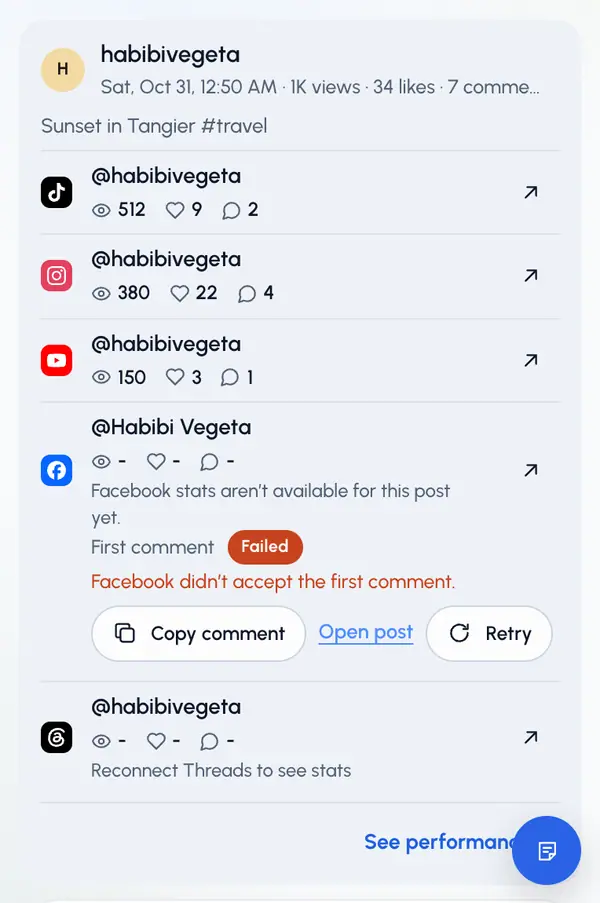
When a first comment fails, you can:
- Tap Copy comment, then paste it under the post yourself.
- Tap Open post to open the post on the network.
- Tap Retry, when it's offered.
If the network didn't confirm the comment, check the post before you retry, so you don't post it twice.