Write the caption
On the Text step of posting, you write one caption that goes to every account you picked.
Type your words, hashtags and @mentions in Caption. A caption is required.
Watch the counter under the box. It counts against the tightest limit among the networks you picked, and names that network.
Read the line under the counter. It shows where the caption goes: as the caption on most networks, and as the description on YouTube.
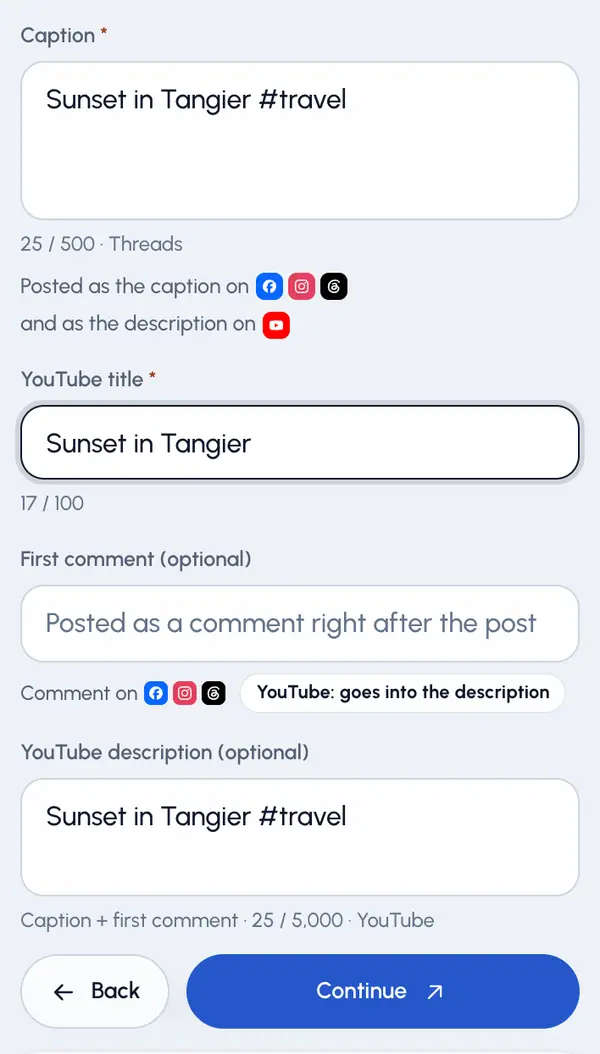
Add a title
When YouTube or Reddit is selected, a title field appears. It's required for those networks. A YouTube title can be up to 100 characters and a Reddit title up to 300.
Use different text on one network
Open Different text per network. It shows when you post to two or more networks, or to one that has a title.
Under a network, type its own caption or title. Leave a field empty to use the text above.
For YouTube, the description has its own field: YouTube description (optional). It starts as your caption plus your first comment. Edit it to use your own text, or tap Use caption + first comment to go back.
Length limits
- TikTok and Instagram: 2,200 characters
- YouTube description: 5,000 bytes (fewer characters if you use emoji or non-Latin letters)
- Facebook: 63,206 characters
- LinkedIn: 3,000 characters
- Threads: 500 characters
- X: 280 characters
- Instagram also allows at most 30 hashtags and 20 @mentions.
If something is too long or missing, you can't continue until you fix it. If the final check finds a problem when you send, you're taken back to this step with a list of what to fix.
You can't change a post's text after it's scheduled. To change it, cancel the post and post the video again.