These settings are on the Text step of posting, under Network settings.
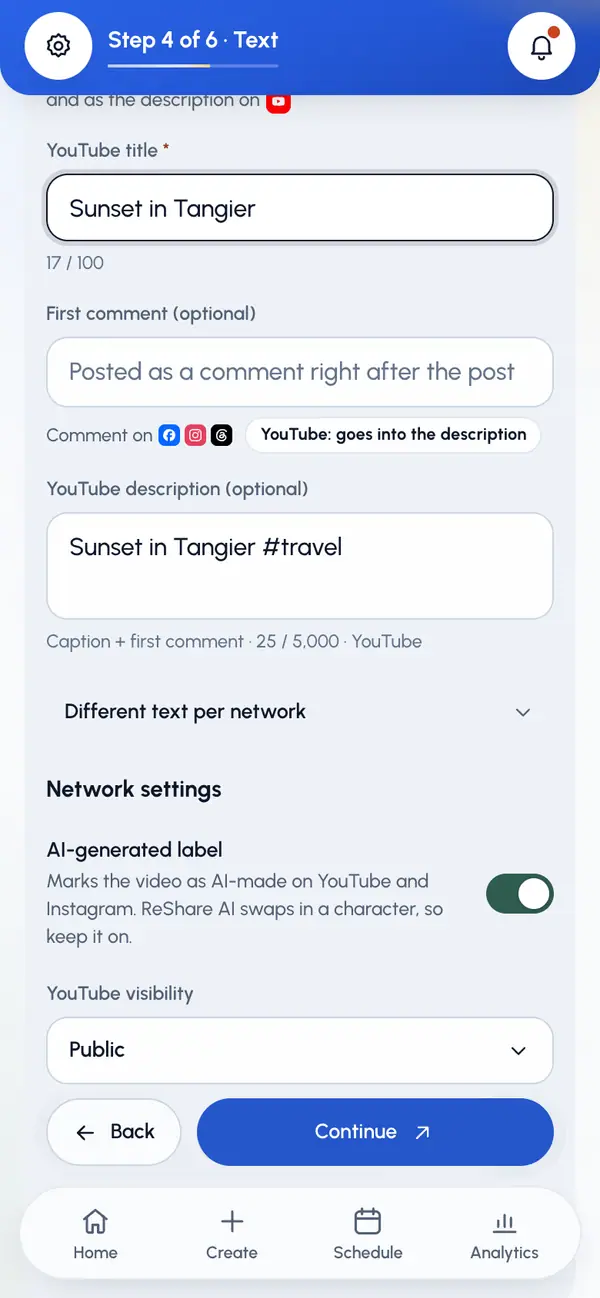
The AI-generated label
AI-generated label is on by default. It marks the video as AI-made on YouTube and Instagram. Because ReShare AI swaps a character into your video, we suggest you keep it on.
- The label is sent to YouTube and Instagram only. Other networks don't get it.
- One switch covers the whole post. You can't set it per network.
- On the Check and send step, the YouTube and Instagram rows show whether the label is on or off.
YouTube
Pick a YouTube visibility: Public (the default), Unlisted or Private.
Make sure the post has a title. YouTube needs one, up to 100 characters.
Every YouTube upload is sent as a Short and as not made for kids. You can't change either. YouTube has no first comments, so your first comment goes into the description, unless you wrote your own YouTube description. A custom cover needs a verified YouTube channel, and Shorts may ignore it.
Instagram has no extra switches here, apart from the AI-generated label. The frame you picked becomes the Reel cover. Keep in mind:
- Captions can be up to 2,200 characters, with at most 30 hashtags and 20 @mentions.
- Your first comment is posted under the post once it's live.
- For a video you uploaded yourself, Instagram takes Reels from 3 seconds to 15 minutes. You'll see a note on the Where? step if yours is outside that.
Post as Reel is on by default, because Facebook shows vertical video as a Reel. Switch it off to post a regular video. Facebook may keep its own cover instead of the one you picked.