Open Usage
Tap the gear at the top of the screen.
Tap Usage.
Under the title you see your plan's name.
This billing period
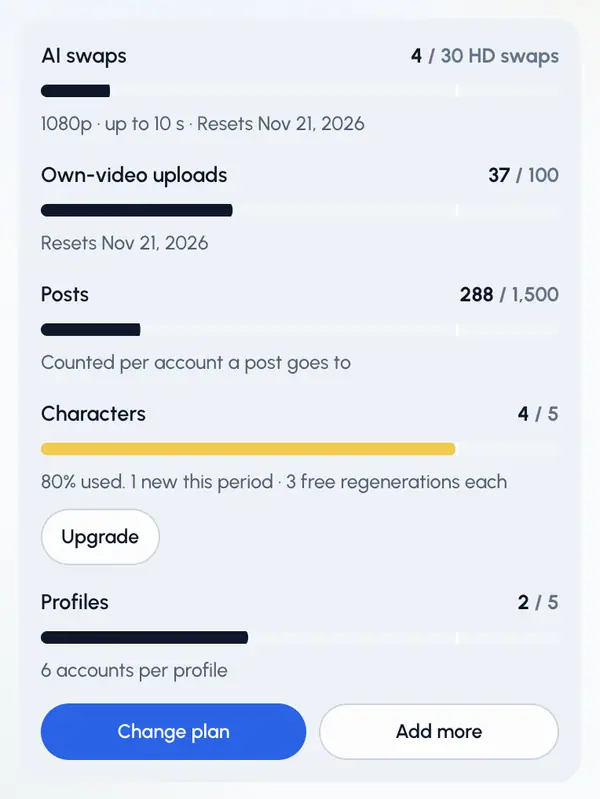
The This billing period section has a meter for each thing your plan counts:
- AI swaps: swaps used this period out of your plan's allowance, at your plan's quality, and the date they reset. Swaps from swap packs are shown as an extra. This meter shows on plans that include AI swaps.
- Own-video uploads: your own videos uploaded this period.
- Posts: posts made this period. A post counts once for each account it goes to.
- Characters: how many character places you use, how many new characters you can make this period, and the free regenerations each one gets.
- Profiles: how many profiles you use, and how many accounts each profile can have.
When a meter is full
- If a bigger plan exists, the meter shows Upgrade. It opens the plans.
- Tap See plans (on the Free plan) or Change plan to compare plans.
- On a paid plan, tap Add more to add more to your plan in Settings.
In the ReShare AI app on a phone, you may see only the meters, without the plan buttons.
Good to know
- The meters show when plans are available on your account. If the plans page says plans are coming soon, they aren't on sale yet and everything keeps working as it does today.
- Where an allowance resets, the meter shows the reset date.
- Where plans aren't available, Usage shows what you made this month and its cost, with recent activity, instead of plan meters.