The bell
The bell at the top of the screen lists what happened while you were away. On a phone, it opens from the bottom of the screen. It tells you when:
- a swap or one of your own uploaded videos is ready, or failed;
- a post went out, partly went out, or failed;
- you're running low on swaps, on plans that include AI swaps;
- a network on one of your profiles needs to be reconnected.
Tap a notice to open it. You can mark one notice as read, or all of them at once. The bell checks for news about every 30 seconds.
Activity
Activity shows how your videos and posts are coming along: queued, being made, ready or failed for videos, and scheduled, publishing, published or failed for posts.
- On a computer, tap the Activity button at the top of the screen.
- On a phone, tap the gear, then Activity.
Phone notifications
If you use the ReShare AI app on your phone, it can also send notifications.
The first time you start a swap, the app asks if you want them. Tap Turn on notifications, or Not now.
If you said yes, allow notifications when your phone asks.
The app never asks when it opens, and never asks twice. Tapping a notification opens the video or post it's about. If the app is already open, it shows as a short message instead.
Choose what your phone tells you
Tap the gear, then tap Settings.
Scroll to Notifications.
Turn each kind on or off: Swap ready, Swap failed, Post published, Post failed and Running low on swaps.
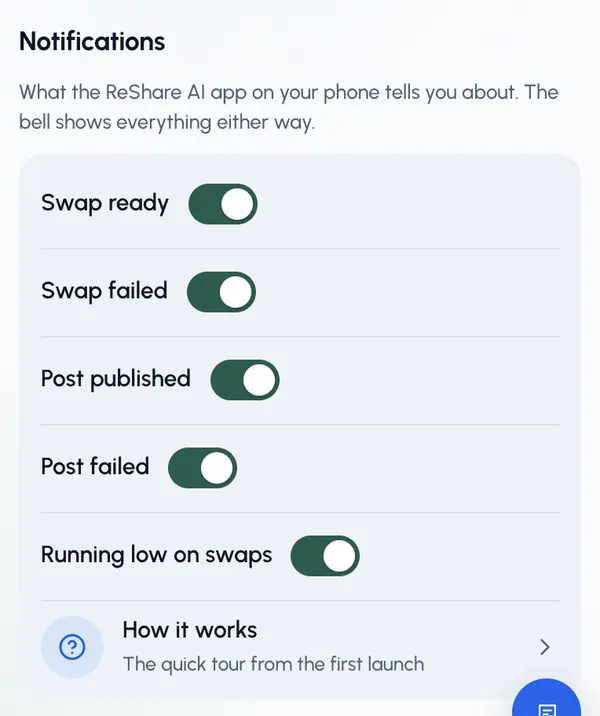
These switches apply to every phone signed in to your account, even when you change them on the website. The bell always shows everything, whatever you choose here.
If you see Notifications are off in the app, tap it to turn notifications on. If you turned them off for ReShare AI earlier, turn them back on in your phone's settings.
If phone notifications don't arrive even with the switches on, the bell and Activity still have every update.
To see the first-run tour again, tap How it works.