What a plan counts
Every plan sets an allowance for:
- AI swaps: videos with your character swapped in. The plan also sets the quality and the longest clip a swap can be.
- Own-video uploads: videos you post as they are.
- Posts: counted once for each account a post goes to. One post sent to TikTok and Instagram counts as two.
- Characters: how many you can have at once. You can also make that many new ones each period.
- Profiles: how many profiles you can have, and how many accounts each profile can hold.
Each character also comes with 3 free regenerations.
The plans
- Free: no AI swaps and no characters. 5 uploads and 5 posts a month, 1 profile with up to 2 accounts.
- Starter: about 10 swaps a month at 720p, up to 10 seconds each. 30 uploads, 300 posts, 3 characters, and 2 profiles with up to 4 accounts each.
- Creator: about 30 HD swaps a month (1080p, up to 10 seconds). 100 uploads, 1,500 posts, 5 characters, and 5 profiles with up to 6 accounts each.
- Pro: about 60 HD swaps a month of up to 15 seconds. 300 uploads, 5,000 posts, 10 characters, and 15 profiles with up to 8 accounts each.
- Agency: about 150 HD swaps a month of up to 15 seconds. 1,000 uploads, 15,000 posts, 20 characters, and 40 profiles with up to 8 accounts each.
The number of swaps assumes every clip is as long as the plan allows. Shorter clips use less of your allowance, and every swap counts as at least 3 seconds. You'll find the prices on the plans page.
Monthly or yearly
On the plans page, pick Monthly or Yearly. A yearly plan is billed once a year and gives you 2 months free.
Your allowances reset every month, on yearly plans too.
See what you've used
Open the account menu (the gear at the top) and tap Usage.
Under This billing period, each meter shows what you've used. The AI swaps and uploads meters also show when they reset.
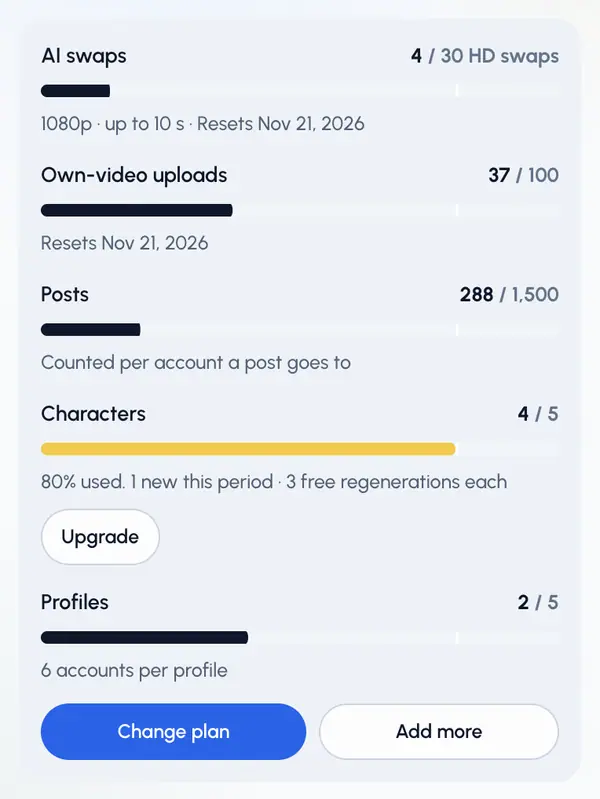
The same meters are in Settings, under Plan & billing.