On this page
Profiles hold your accounts
A profile is a brand or client. It holds the social accounts you post to, and when you post a video you pick the profile to post as. Other users can't see your profiles.
Add a profile
Open Profiles. On a computer it's in the side dock. On a phone, tap Settings and account (the gear) and choose it there.
Tap Add profile.
Type a name in Profile name, up to 100 characters.
Tap Add.
Connect a network
Each profile card shows a tile per network: TikTok, Instagram, YouTube, Facebook, LinkedIn and Threads, plus X, and Reddit when it's available.
On the profile card, tap a grey tile that says Connect.
The network's sign-in page opens in the same tab. Sign in and pick the account you want. You have 30 minutes to finish.
You come back to Profiles with a message that the network is connected. The tile turns green and shows the account's handle.
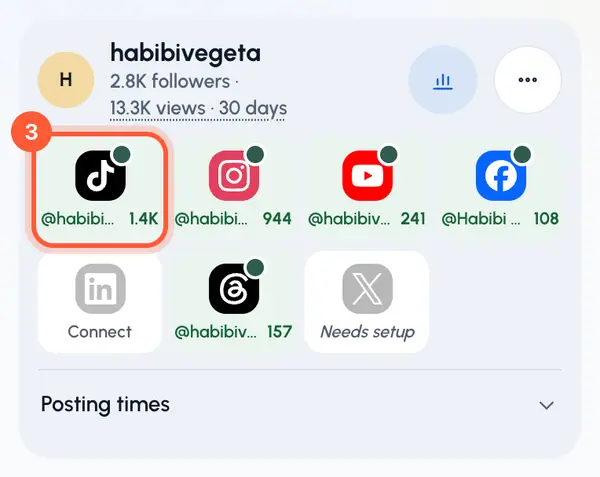
If the message says it's connected but not visible yet, refresh the page after a moment.
Facebook and LinkedIn pages
After you sign in to Facebook or LinkedIn, a card asks you to pick pages.
Tick the pages you want under Pages. Each page becomes its own account on the profile.
Tap Connect. Tap Not now to skip.
More than one account
To add a second account on the same network, tap the green tile and choose Add another account.
Good to know
- One social account can belong to only one profile. If it's already on another of your profiles, disconnect it there first.
- If X shows Needs setup, it can't be connected yet. Reddit only shows a tile once it can be connected.
- When plans are on for your account, each profile can hold a set number of accounts. Reconnecting an account doesn't count against it. See plans.
- If an account stops working, its tile asks you to reconnect. Tap the tile, then Reconnect, and sign in again.