On this page
When you start a swap, its page opens and shows how far along it is. The page updates by itself.
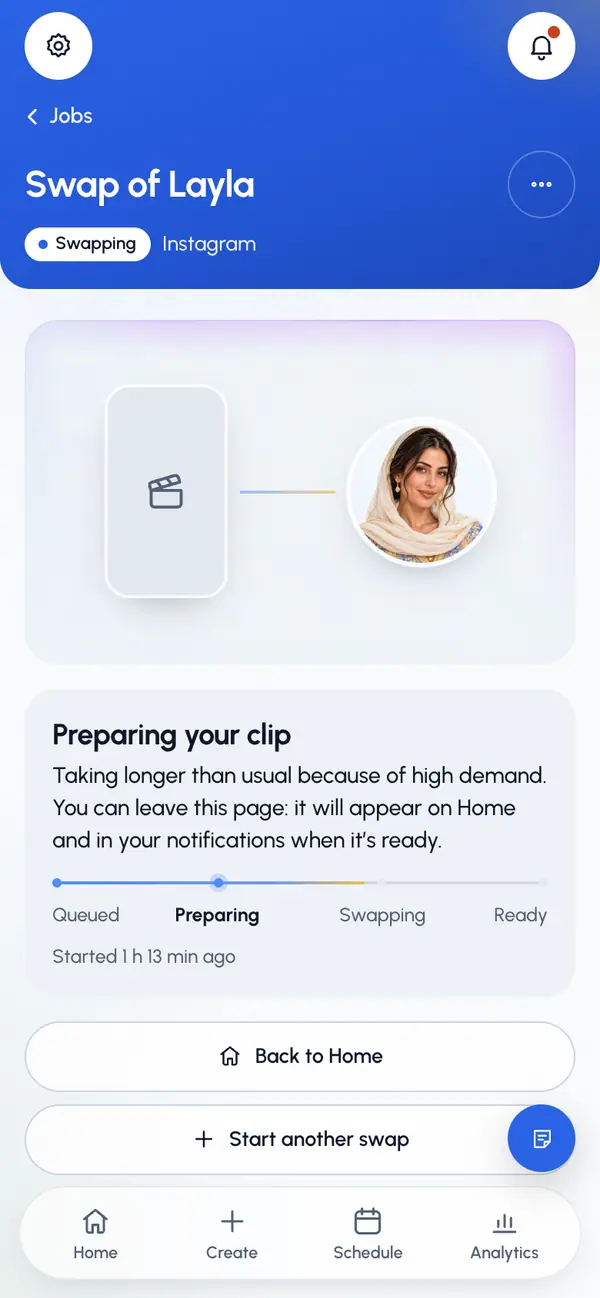
The steps of a swap
Queued: your swap waits its turn.
Preparing: ReShare AI gets your clip ready and sends it off.
Swapping: your character is put into the video.
Ready: the video plays on the page, ready to post.
Your own videos take a shorter path: Queued, Cutting, then Ready.
How long it takes
A swap is usually ready in 5 to 10 minutes. The page shows how long ago it started, not a countdown. If it takes longer, the message changes to say the video service is busy, but your swap is still in progress. Your own videos are usually ready in a minute or two, and right away if you didn't trim them.
You can leave the page
The swap keeps going when you close the page or the app. When it's done:
- It shows on Home.
- A notice appears under the bell at the top of the screen, for swaps and your own videos. When the video is ready, tapping it opens the posting page. If it failed, tapping it opens the video's page.
- In the phone app, if you turned on notifications, you get a notification. The first time you start a swap there, the app asks if you want them.
To find it later, open Jobs. See Your videos.
While you wait
- Tap Start another swap to make another swap, or Back to Home to go Home.
- You can't delete a video while it's being made. Wait until it's ready or has failed.
When it's ready
Tap Post or schedule to post it to your networks or schedule it.
If it fails
The page says This swap didn’t finish and why, when the reason is known. See Your videos for what to do next.