On this page
Open Schedule and tap the post to open its details. The buttons at the bottom depend on the post's status.
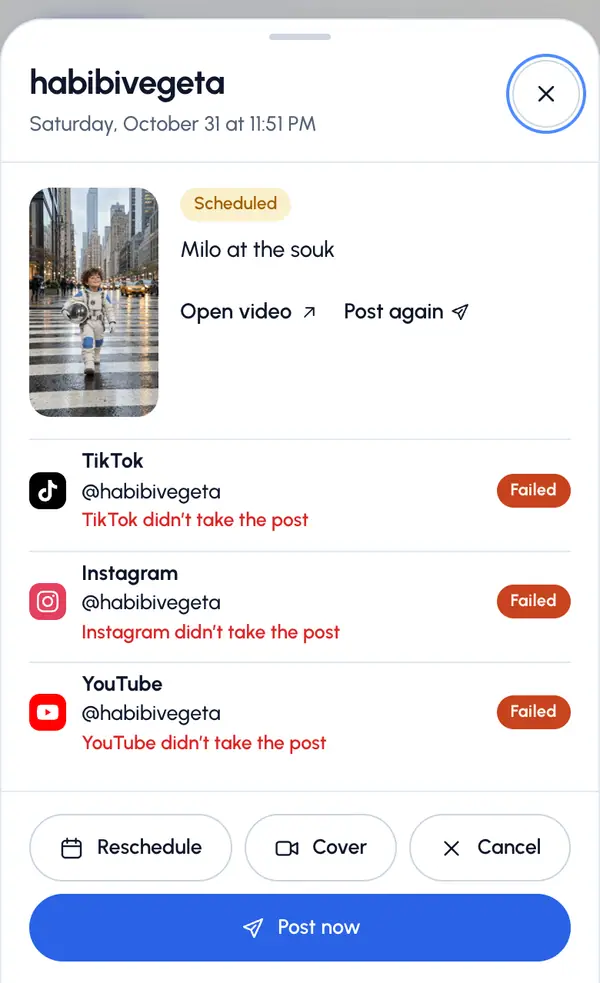
Move it to another time
Tap Reschedule.
Pick the Day and the Time. The post keeps its own time zone, shown under the picker.
Tap Save time, or Back to leave it as it was.
On a computer, you can also drag a scheduled post's chip to another day on the calendar. It keeps the same time.
Change the cover
This button shows while the video is still available.
Tap Cover.
Drag the filmstrip to the frame you want.
Tap Save cover.
Post it now
Tap Post now.
Confirm with Post now, or tap Not yet.
Cancel it
Tap Cancel.
Tap Cancel post, or Keep it.
The post won't go out, and the video stays where it is.
You can only change, post now or cancel a post while it's scheduled and nothing has gone out yet. Once it starts publishing, it's too late.
Retry a failed post
A failed network shows why it didn't go out, and what you can do:
- Retry: tap the retry button on that network. When two or more failed networks can be retried, Retry all failed retries them at once. Networks that need a reconnect or a wait aren't part of it.
- Reconnect: the account needs a new sign-in. Tap the reconnect button, sign in again in Profiles, then come back and retry.
- Wait: the network is busy. It says Try again later.
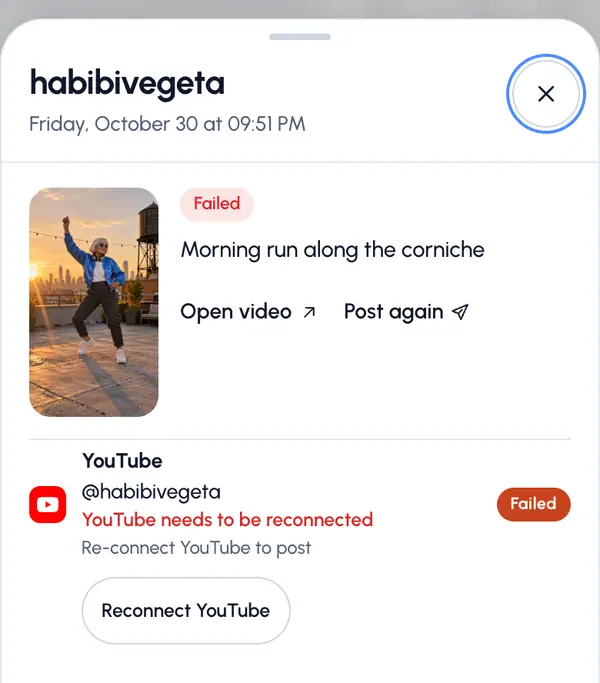
On the video's page, Retry failed retries every failed network of that post. A retry keeps the original time if it's still ahead, and otherwise goes out right away.
What you can't change
- The caption, title or first comment of a scheduled post. Cancel it and post the video again.
- Which accounts a scheduled post goes to.
- A failed post can't be removed, and a post that's already published can't be deleted from ReShare AI. Delete it on the network itself.