On this page
Who can see your things
Other ReShare AI users can't see your characters, videos, profiles or posts. Once you post, the network's settings decide who sees it. A Reddit post links to a public page with the video.
The Privacy Policy explains what ReShare AI collects, why, and who processes it for us. You can open it any time from Settings, under Legal.
Privacy & data in Settings
Open Settings and scroll to Privacy & data. On a phone, Settings is in the account menu (the gear at the top).
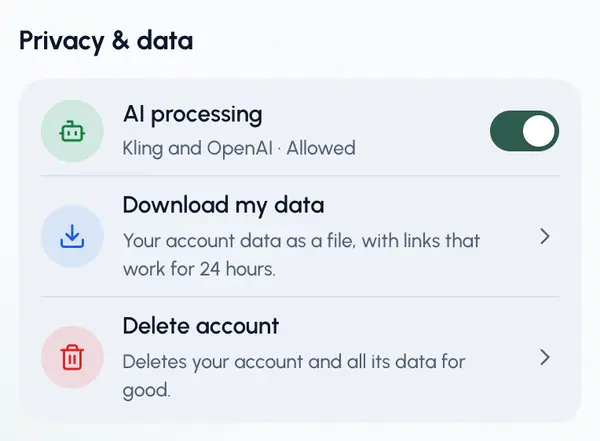
AI processing
To make your content, ReShare AI sends the images and videos you provide to its AI providers: OpenAI draws your characters, and Kling makes the swapped video. The first time you add a character photo, draw a character or start a swap, a notice explains this, and you tick the box and tap Continue to agree.
The AI processing switch shows whether you agreed. Turn it off to withdraw: nothing new is sent to the AI providers. A swap or character already being made may still finish. While it's off, the notice comes back the next time you add a character photo, draw a character or start a swap. Turning the switch back on shows the notice too.
Download my data
Tap Download my data to save a file (JSON) with your account details, what you agreed to and when, your characters, videos, posts and where they went, your profiles and connected accounts, your devices, notification settings, the names of your API keys and a billing summary if you've ever had a plan or bought a pack. It contains no passwords or keys. The links to your pictures and videos in the file work for 24 hours. If the file doesn't save in the phone app, download it from a browser instead.
You can download your data once every 10 minutes.
What you can delete yourself
- A video: on the video's page, open More (the three dots) and tap Delete video. You can't delete a video while it's being made, while one of its posts is going out, or once it has been posted.
- A character: open the character's menu (the three dots) and tap Delete character. Videos you already made with it stay.
- An upload: in Post my own video, open the upload's options and tap Delete upload. You can't delete it while it's still being checked, or once a video made from it has been posted.
- A scheduled post: in Schedule, open the post and tap Cancel.
- A connected account: in Profiles, tap the network and choose Disconnect.
- A profile: in Profiles, open the profile's menu and tap Delete profile.
Deleting something in ReShare AI doesn't remove posts that are already live. Delete those on the network itself.
Delete your account
In Settings, under Privacy & data, tap Delete account. You see what will be deleted before you confirm. See Delete your account.