How to Make Videos with Claude Code and Post Everywhere
We asked Claude Code to make a short AI character video in ReShare AI, write a caption for each network, preview the post and schedule it to TikTok, Instagram, YouTube, Facebook and Threads. Here is every step, with excerpts from the real, redacted transcript.

- Guides
- Claude
- MCP
- AI video
- Scheduling
- Social media
- Claude Code
- ReShare AI
Yes, you can make short videos with Claude and post them everywhere. Connect Claude to ReShare AI once, then ask it in plain words to swap your character into a clip, write a caption for each network and schedule the post after you approve the preview.
We tested this for real on 13 November 2026. One Claude Code conversation took us from "which ReShare account are you connected to?" to a video scheduled on TikTok, Instagram, YouTube, Facebook and Threads. Below is every step and what Claude did.
What you need
- A ReShare AI account with at least one connected social account. AI character swaps need an AI plan. Posting your own videos works on every plan.
- Claude: claude.ai, the Claude Desktop app, or Claude Code in a terminal.
- About 2 minutes to connect. The video takes longer, because a swap renders on ReShare's servers. Ours took about 11 minutes.
Step 1: Connect Claude to ReShare AI
ReShare AI runs an MCP server at https://www.reshare.ai/api/mcp. MCP (Model Context Protocol) is an open standard that lets an AI app use tools in other services. You connect once. After that, Claude can see your profiles and characters and act for you.
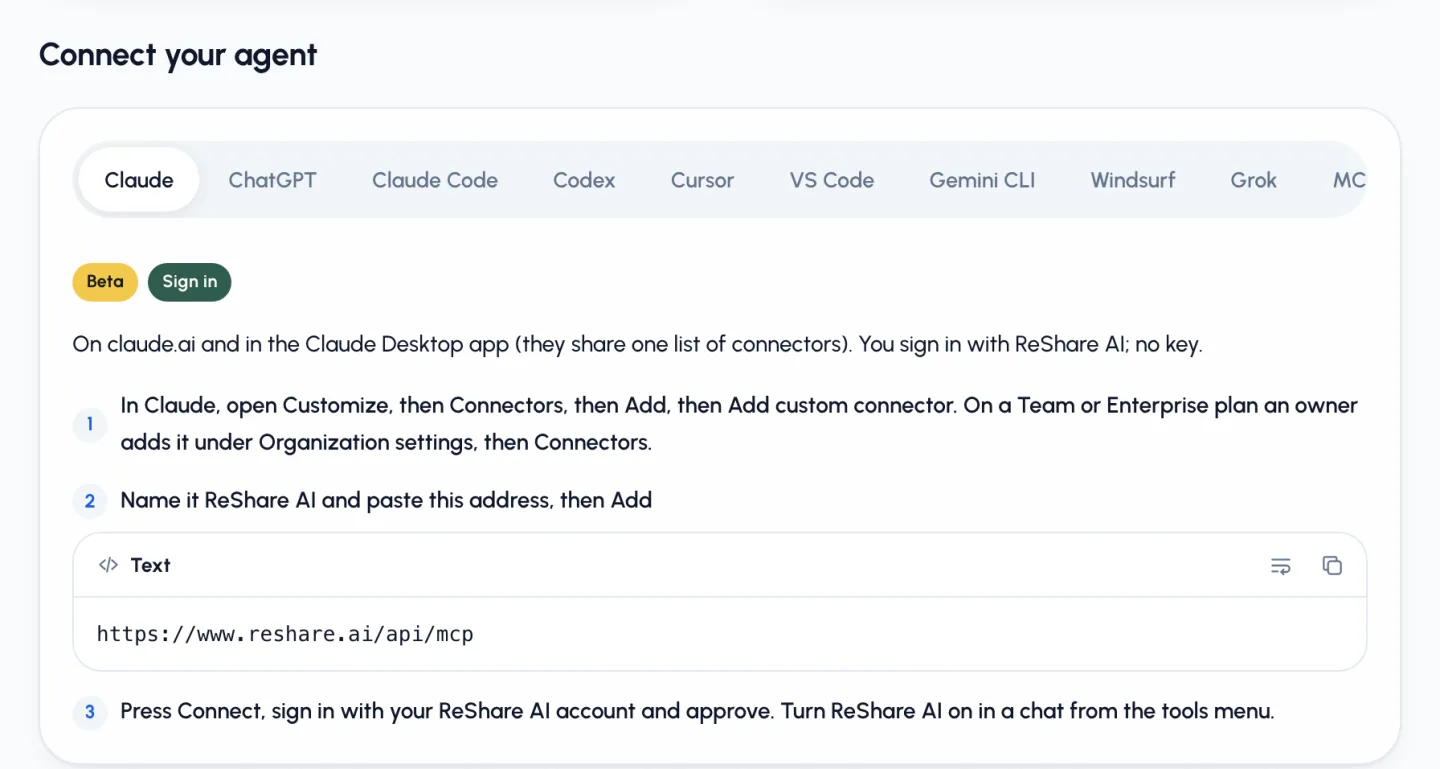
In claude.ai or Claude Desktop (sign in, no key). ReShare marks this sign-in as Beta.
- Open Customize, then Connectors, then Add, then Add custom connector. On a Team or Enterprise plan, an owner adds it first under Organization settings, then Connectors.
- Name it ReShare AI and paste
https://www.reshare.ai/api/mcp. - Press Connect, sign in with your ReShare AI account and approve.
- In a chat, turn ReShare AI on from the tools menu.
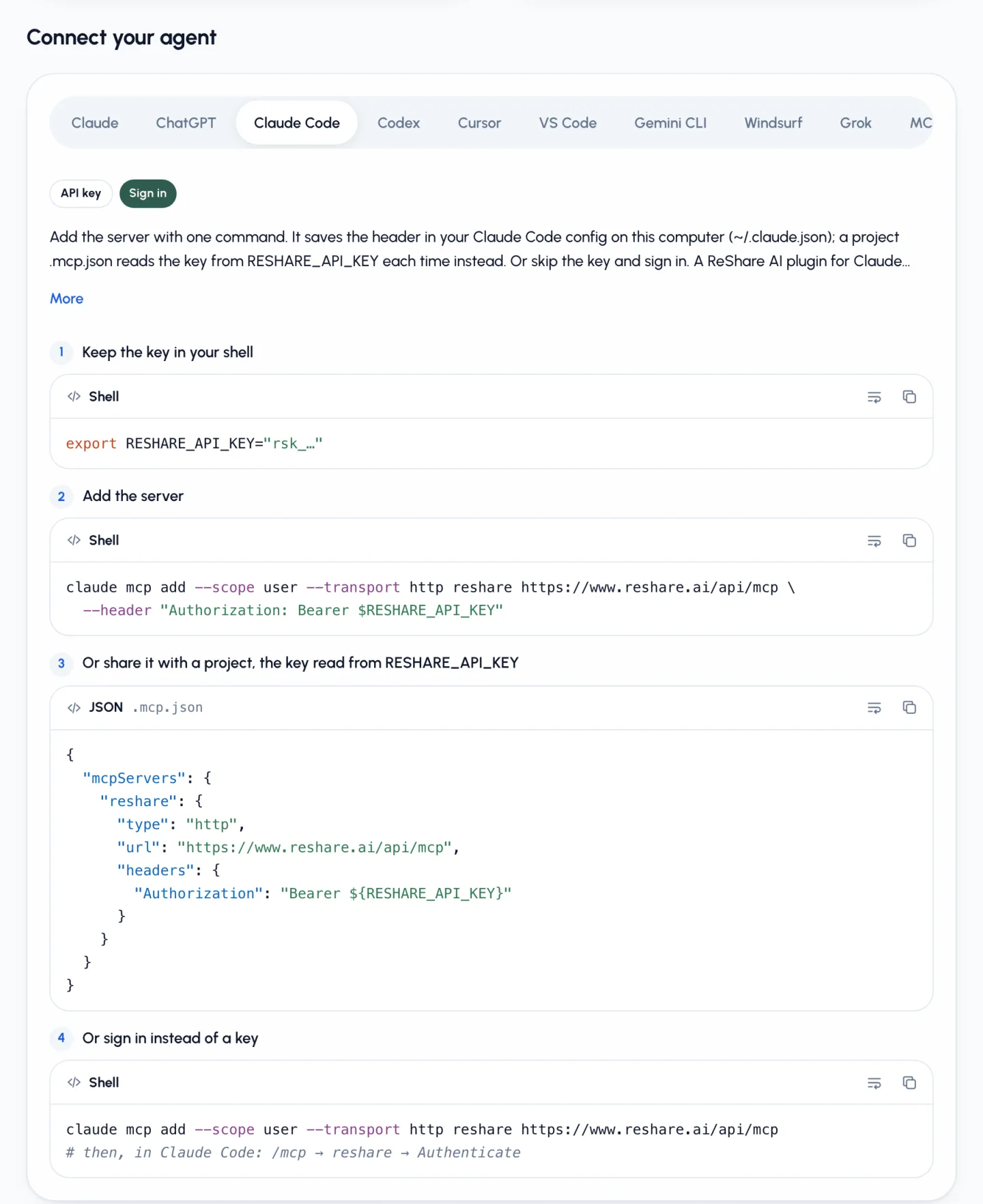
In Claude Code (API key). Create a personal key in ReShare under Settings, then Connect your agent. Pick what it may do: Read, Make videos, Post. Keep the key in your shell, never in a file you commit.
export RESHARE_API_KEY="rsk_…"
claude mcp add --scope user --transport http reshare https://www.reshare.ai/api/mcp \
  --header "Authorization: Bearer $RESHARE_API_KEY"
You can also share it with one project through a .mcp.json file that reads ${RESHARE_API_KEY} from your shell. That is what we used. Or skip the key: add the server without the header, then run /mcp in Claude Code and choose Authenticate.
Step 2: Ask Claude what it can see
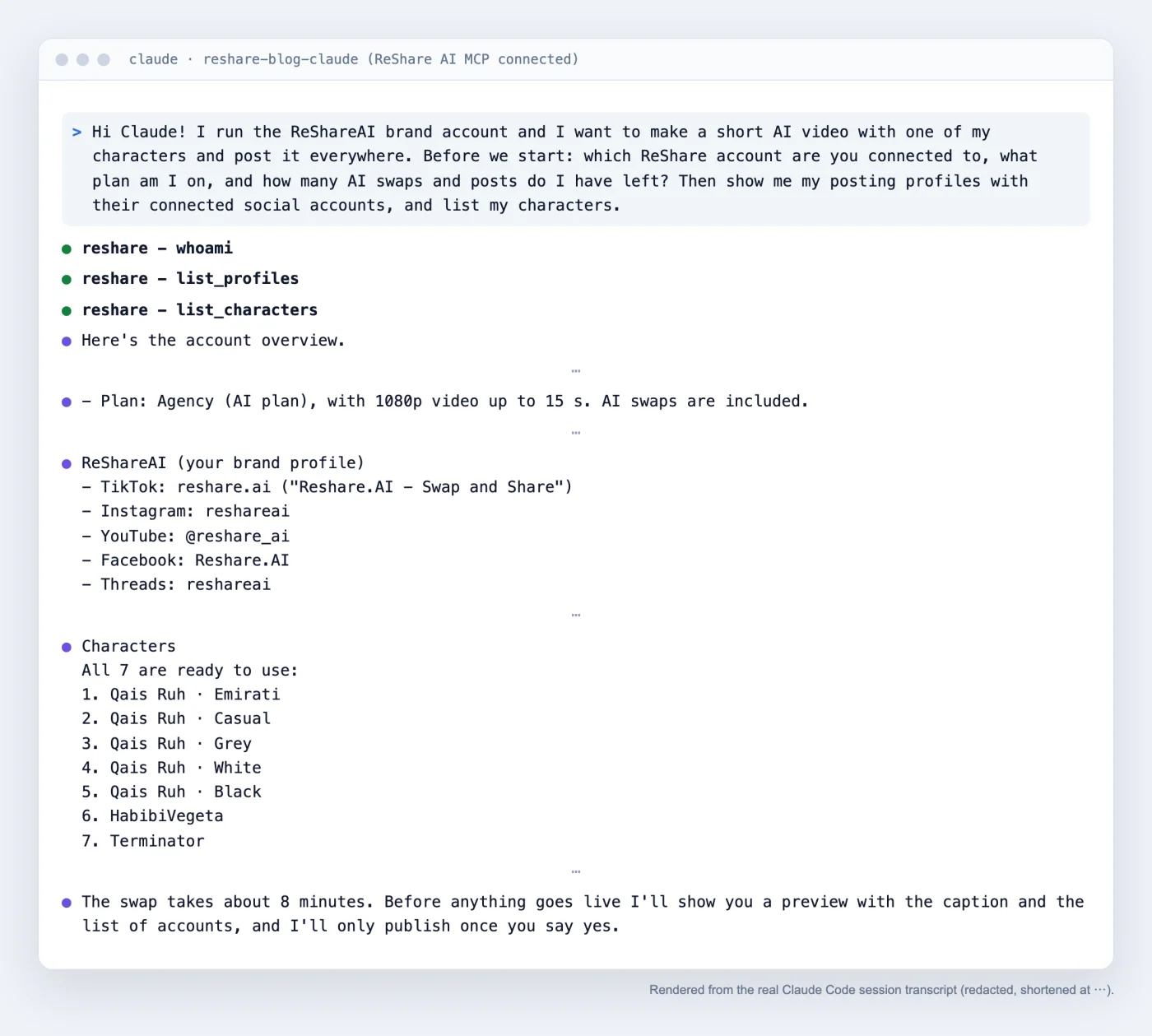
Start with a question, not a task. We asked:
… Before we start: which ReShare account are you connected to, what plan am I on, and how many AI swaps and posts do I have left? Then show me my posting profiles with their connected social accounts, and list my characters.
Claude called whoami, list_profiles and list_characters. It showed our ReShareAI profile with five connected accounts (TikTok, Instagram, YouTube, Facebook and Threads) and seven ready characters. It also said, without being asked:
Before anything goes live I'll show you a preview with the caption and the list of accounts, and I'll only publish once you say yes.
Step 3: Make the video
A character swap keeps the moves, the camera and the sound of a short clip and puts your character in it. You need two choices: the character and the source clip.
The character. We picked Qais Ruh · Emirati, one of our own original characters. It does not look like a film or anime character, and its white Emirati look fits the Gulf style of our brand videos. Claude had first suggested Qais Ruh · Black because that look already had three good swaps. That was a fair point, but brand fit came first for us.
The source. We told Claude not to bring in any new video from someone else. We chose a 10-second clip already in our library: an earlier Qais Ruh · Black swap in a blue flower field. That earlier swap was made from an Instagram reel we had already used. So nothing new came in, but the scene is not footage we shot. Claude pointed this out when it listed our videos. The same scene with a new look is a simple way to show what a swap does.
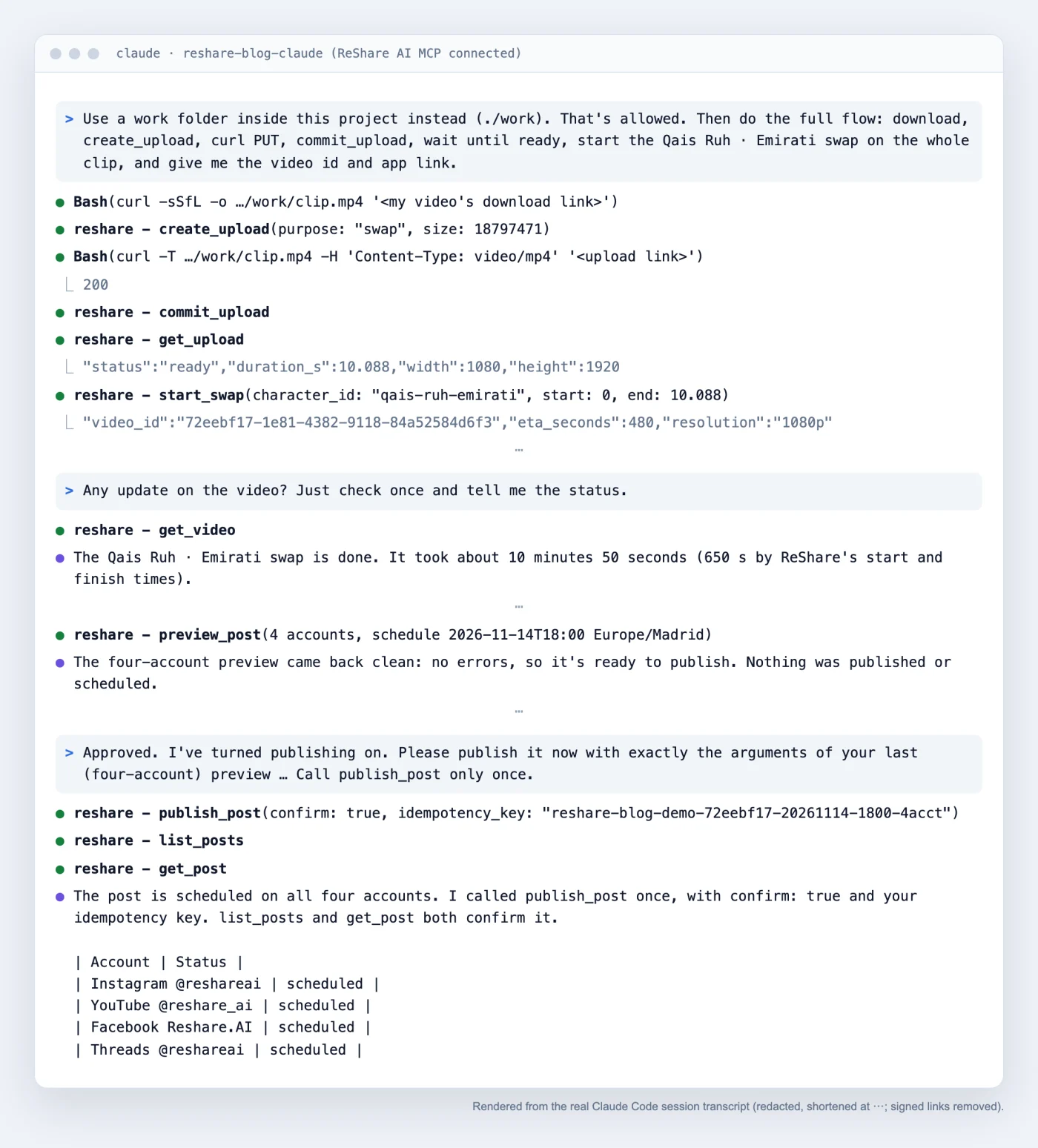
Claude Code downloaded that clip and uploaded it back as a swap source. That uses create_upload, a curl upload and commit_upload. Then it called start_swap for the whole clip. The answer came back right away with a video id and an estimate of 480 seconds.
Three honest notes from the run:
- Claude Code runs shell commands only when you allow them. Our session could not show permission prompts, so the first download tries were denied. After we allowed
curland a few file commands, a folder outside the project was still blocked. Using a work folder inside the project fixed it. - A file link is not a swap source.
start_swaptakes an upload or an Instagram, TikTok or YouTube link. ReShare refused the clip's own file link, which is why we re-uploaded it. - The swap took longer than the estimate. It finished in 650 seconds, about 11 minutes. We asked "Any update on the video?" about once a minute while it ran.

Step 4: Let Claude write the captions
We gave Claude our voice in two lines: "Put your character in any short video, then post it everywhere" and "Keep the moves, the camera and the sound. Your character takes the lead." We asked for English, short sentences, 3 to 5 hashtags where the network uses them, a YouTube title, and a clear note that this is an AI swap.
Claude wrote one caption per network. Here is the Instagram one, exactly as scheduled:
Same scene, new look.

An AI character swap: our character Qais Ruh went from the black outfit to the white Emirati one. Same field, same moves, same sound.

Put your character in any short video, then post it everywhere.

Try it at reshare.ai

#aicharacter #aivideo #characterswap #reshareai #emiratistyle
The YouTube title was "Same Scene, New Look: AI Character Swap with Qais Ruh". Every caption stayed well inside each network's limits, and the post carries the AI-generated label.
Step 5: Preview, then schedule
We asked for a preview only, for Saturday 14 November 2026 at 18:00 Madrid time. preview_post checks accounts, caption and title limits, video length and the time, and it sends nothing.
The preview covered all five accounts. TikTok needs one extra choice: who can see the post. Claude asked us, with the options our account allows, such as "everyone", "mutual friends" or "only me".
We chose "everyone", and Claude passed it as tiktok.privacy_level. The preview was then clean, with one YouTube note: YouTube uploads share a daily limit, and a refused upload fails only YouTube.
After we said yes, Claude called publish_post once, with confirm: true and an idempotency key, for all five accounts. Then it checked list_posts and get_post. All five accounts show as scheduled for 14 November 2026, 18:00 Europe/Madrid (17:00 UTC). Scheduled means not posted yet.
The real example in short
- What we asked: make a short AI video with an original character, from a clip already in our library, and schedule it everywhere on the ReShareAI profile.
- What Claude did: checked the account, listed profiles and characters, uploaded the clip as a source, ran the swap, checked on it, wrote five captions, previewed all five accounts, asked us who can see the TikTok post and called publish_post once after our yes.
- The result: a 10-second 1080p video of Qais Ruh · Emirati.
- The schedule: Saturday 14 November 2026, 18:00 Madrid, on TikTok, Instagram, YouTube, Facebook and Threads.
- One extra step for TikTok: TikTok needs you to choose who can view each post. Claude asks you, then passes your choice.
Tips that save time
- Start with "what can you see?" Claude then works with your real profiles and ids, not guesses.
- Say where the source comes from. Use clips you own or already have the rights to.
- In Claude Code, allow the few commands it needs. An upload uses
curl. Keep files inside your project folder. - Ask for updates now and then. A swap takes minutes. There is no need for a tight checking loop.
- Ask for every caption word for word before the preview. You see exactly what each network gets.
- Keep publishing off until you approve. We left
publish_postout of the tools Claude Code could use until we had read the preview.
Stay in control: preview, permissions, revoke
- Preview before publish.
preview_postis a dry run. ReShare tells every agent to show you the preview first. - Publishing needs a clear yes.
publish_postonly works withconfirm: trueand a one-time key, so a retry never posts twice. - Give only the permissions you need. A key or connected app gets only what you allowed: Read, Make videos, Post.
- Your data only. An agent sees only your own characters, videos, profiles and posts.
- Revoke at any time. In Settings, then Connect your agent, revoke a key or disconnect an app. It stops at its next request.
- Limits match the app. 120 requests a minute per key or app, uploads up to 95 MB, and your plan counts exactly as in the app.
More in the agent safety guide.
Other agents work the same way
The same server works with ChatGPT, Codex, Cursor, VS Code, Gemini CLI, Windsurf, Grok and other MCP clients. Apps that add a server by its address open a ReShare AI sign-in page. Coding tools can send a personal key. The tool names are the same everywhere. Setup steps for each one are on the agents docs page.
Sharing plans or AI plans?
If you only want to post videos you already have, a Sharing plan is enough. Sharing plans start at $9 a month and include no AI swaps. Claude can still upload your clip, trim or stitch it, write the captions and schedule it everywhere. Character swaps like the one here need an AI plan, from Starter at $29 a month (10 swaps, 720p, up to 10 seconds) to Agency at $499 (150 swaps, 1080p, up to 15 seconds). See Post everywhere and Pricing.
Key takeaways
- Claude can make and schedule short videos once you connect it to the ReShare AI MCP server at https://www.reshare.ai/api/mcp.
- claude.ai and Claude Desktop connect with a ReShare sign-in (Beta). Claude Code can use a personal API key or sign in.
- In our test, Claude listed profiles and characters, ran an AI character swap (about 11 minutes), wrote five network captions and scheduled it on all five of the profile's accounts with one publish_post call. For TikTok, it first asked us who can see the post.
- Nothing goes out without your yes: preview_post is a dry run, and publish_post needs confirm: true plus an idempotency key.
- Posting your own videos works on Sharing plans from $9 a month. AI character swaps need an AI plan, from $29 a month.
Conclusion
Making a video with Claude comes down to one connection and a few plain requests. Connect ReShare AI once, ask Claude what it can see, pick a character and a clip you have the rights to, and let it write the captions. Always read the preview before you approve. In our run, the whole flow from first question to a post scheduled on five networks happened in one Claude Code conversation. TikTok needed one extra choice, who can see the post: Claude asked us and passed our answer on.
Frequently asked questions
Can Claude make videos?
Not on its own. With the ReShare AI MCP server connected, Claude can start an AI character swap in your ReShare account, check on it and get the finished video. ReShare renders the video. Claude runs the steps, writes the captions and schedules the post after you approve it.
Do I need Claude Code, or does claude.ai work too?
Both work. In claude.ai and Claude Desktop you add ReShare AI as a custom connector and sign in with your ReShare account, with no key (marked Beta). In Claude Code you can add the server with a personal API key or sign in. Claude Code can also upload a video file from your computer, which is what we did in this example.
Will Claude post without asking me?
No. preview_post only checks the post and sends nothing. publish_post needs confirm: true after you agree, plus a one-time idempotency key, so a retry never posts twice. You can also give the key no Post permission, or keep publish_post out of the tools Claude Code may use until you approve.
Which social networks can Claude post to through ReShare AI?
The networks ReShare AI supports: TikTok, Instagram, YouTube, Facebook, LinkedIn and Threads. X is coming soon. In our test on 13 November 2026, all five were scheduled for the same time with one publish_post call. For TikTok, Claude asks you who can see the post and passes your choice on.
What does it cost?
To post your own videos, ReShare AI has a Free plan and Sharing plans from $9 a month, with no AI swaps. AI character swaps need an AI plan: Starter is $29 a month for 10 swaps (720p, up to 10 seconds), up to Agency at $499 for 150 swaps (1080p, up to 15 seconds). On the Claude side, Anthropic lists custom connectors on Free (one connector), Pro, Max, Ultra, Team and Enterprise plans.
Sources
- https://modelcontextprotocol.io/docs/getting-started/intro
- https://code.claude.com/docs/en/mcp
- https://support.claude.com/en/articles/11175166-get-started-with-custom-connectors-using-remote-mcp
- https://www.anthropic.com/news/model-context-protocol
- https://www.reshare.ai/docs/agents
- https://www.reshare.ai/post-everywhere
- https://www.reshare.ai/pricing
- https://www.reshare.ai/llms.txt