Not every post needs a swap. You can post a video you made yourself, or one you already made in ReShare AI. There's no character and no AI, so it's ready in a moment.
Open it
Open Create. On a phone, it's a tab in the bar at the bottom. On a computer, it's in the menu on the left.
Under Or post your own video, tap Post my own video.
This option only shows on Create's first step. If you're in the middle of a swap, tap Change next to the first step, or use Post my own video on Home.
Add your video
Tap Upload a video to choose a file, or From my videos to pick a swap or video you made before.
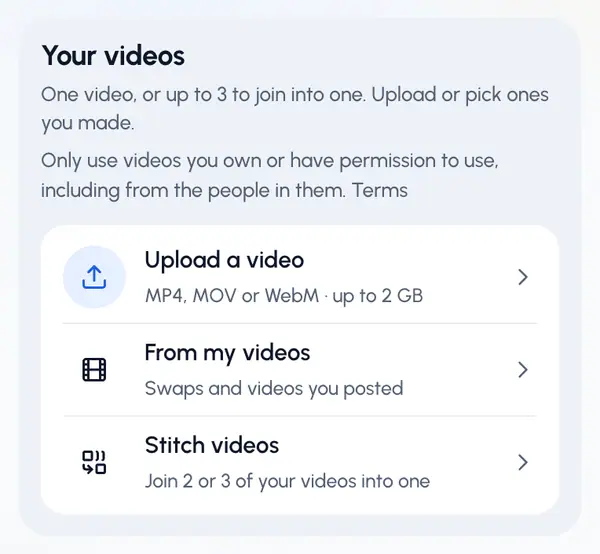
The first time, ReShare AI asks you to confirm you may use the video: tick I own or have permission to use the videos I add, and to post what I make with them. and tap Continue.
If you upload, wait while it uploads and checks the video. To stop, tap Cancel upload.
Tap Continue.
Only post videos you own or have permission to use, including from the people in them. See What you can make and post.
Uploads can be MP4, MOV or WebM, up to the size shown on the upload row. ReShare AI sets no limit on length, but each network has its own limits, and you see notes about them before you post.
In My videos, your ready videos show 12 at a time. Tap Show more to see more.
Trim it (optional)
The video is posted whole unless you trim it.
Turn on Trim.
Drag the start and end handles to cut the beginning or the end. Keep at least 1 second.
Tap Continue.
ReShare AI cuts the video. This usually takes a minute or two, a little longer for long videos. If you don't trim, the video is ready at once.
Post it
When the video is ready, the posting page opens by itself. From there you post it to your networks or schedule it.
Good to know
- If your account has plans and they limit uploads, each video you post this way uses one upload from your plan's allowance, whether it's one video or a stitched one. See plans.
- Uploaded files are kept for 30 days, then deleted. Videos you made from them keep their own copy.
- To start again with nothing added, tap Start over.
- If cutting fails, tap Back to edit and try another cut or the whole video.
- Want to join two or three videos? See Stitch videos together.