On this page
How you find out
- Your notifications (the bell at the top) say the swap failed.
- In Jobs, the video is marked as failed.
- The video's page says This swap didn’t finish.
See why and try again
Open the failed video. Its page shows a short reason when there is one. Otherwise it says something went wrong while making the swap.
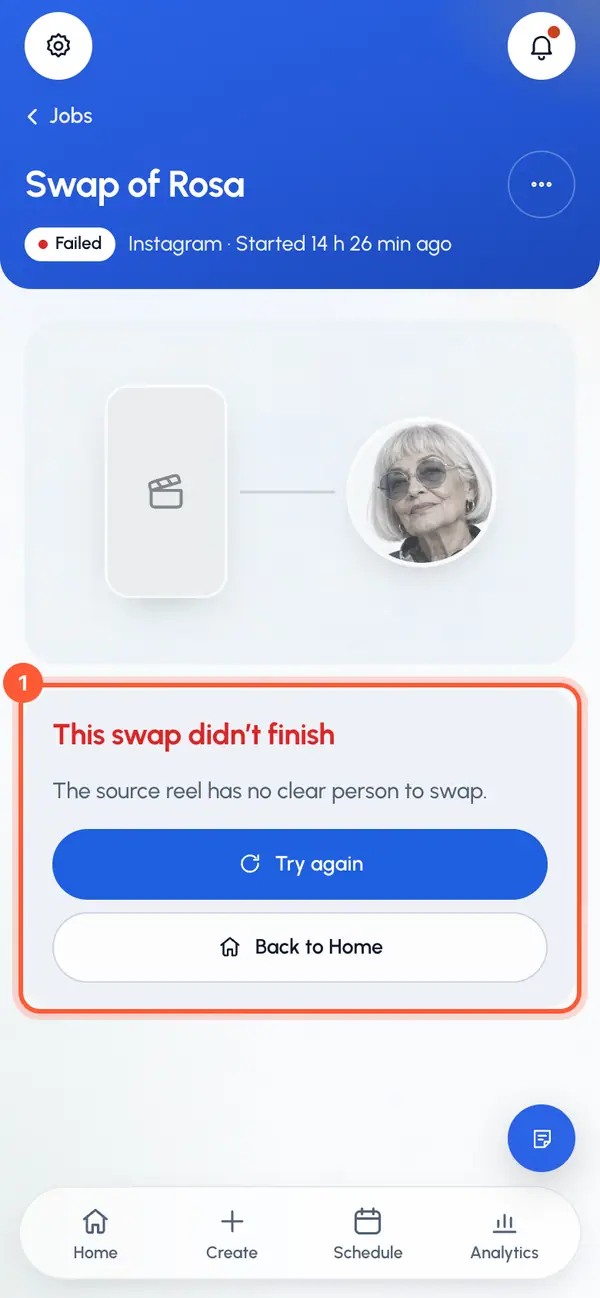
Tap Try again. Create opens with the same reel link already filled in. If you had uploaded the video, Create opens empty, so upload it again.
Go through the steps again: cut the clip, pick the character and start the swap.
Try again starts a new swap. The failed one stays in Jobs until you delete it.
If it fails again with the same reel, pick another reel.
If the content isn't allowed
- This content isn’t allowed: no nudity or sexual content.: the video service refused the content: the video, the character's pictures or your directions. Try another video, or check the character. See What you can make and post.
- Removed after a report that it breaks our Terms. Contact Support if this is a mistake.: our team took the video down after a report. See Report content.
Your swaps aren't used up
A failed swap doesn't use up your plan's swaps: what it held is given back. You only use swaps for videos that finish.
Remove the failed video
On the video's page, open More for this video (the three dots).
Tap Delete video and confirm.
Slow isn't failed
A swap usually takes 5 to 10 minutes. When the video service is busy, it can take longer, and the page says so. You can leave the page: the swap keeps going and shows up on Home and in your notifications when it's ready.
Still stuck? Tap Help & feedback and tell us which video it is. See Contact support.